Saturday, 5 April 2014

DPP Part 2 DR Exercise 6 - Colour Cast and White Balance

DPP Part 2 DR Exercise 6 - Colour Cast and White Balance

The exercise asks for images shot in jpeg with different white balance.

I shoot in RAW and so I've decided instead to use the white balance options in my post processing tool to show the differences. In addition I get exactly the same image and so contrast the differences will be much easier.

Part 1
The purpose of this exercise is to shoot 3 outdoor lighting situations that fit either a sunlight, cloudy or open shade on a sunny day scenes and using the white balance options (I have chosen to use my post processing tool to adjust these rather than the camera) and compare the results

1.1 Sunlight Scene

1.1.a As Shot
The colours are reflective of the scene, and are natural and vibrant


1.1b Auto White Balance
Auto WB has muted the colours in this image, the yellow of the daffodil petals are no longer vibrant in the bright sun and the green foliage has also lost its vibrancy and appears a different colour

1.1c Daylight White Balance
This more reflective of the original image


1.1d Cloudy White Balance
The image is close to the original and I can see where the WB change has accentuated contrast in the shadows however the colours remain slightly unnatural, it appears to have tried to warm the image


1.1e Shade White Balance
I think the WB setting has tried to brighten the image, again close to the original


1.2 Cloudy Scene

1.2.a As Shot

Rather Dull


1.2.b Auto White Balance
Auto WB has muted the colours further making the image more dull


1.2c Daylight White Balance
This setting is nearer the original but the colours are are subdued


1.2d Cloudy White Balance
This has warmed the image but the colours are not quite right


1.2e Shade White Balance
Appears to have warmed the image


1.3 Open Shade on a sunny day scene

1.3.a As Shot


1.3.b Auto White Balance
Auto WB has enriched the colour and given more contrast to the image


1.3c Daylight White Balance
This option has warmed the image but the colours have changed and look less natural


1.3d Cloudy White Balance

This option as above has warmed the image but the colours have changed and look less natural and appears to have some desaturation


1.3e Shade White Balance
.
This option as above has warmed the image


Part 2
The purpose of this exercise is to obtain a mixed outdoor / indoor scene at dusk

2.1 Daylight


2.2 Tungsten

2.3 Auto
Very interesting changes with auto and tungsten very similar


Exercise Learnings
a. the white light that we see has different colour tints subject to the scene and lighting conditions. Since the camera sensor records these differently then our eyes and brain must make adjustments for this

b. Light sources have there own colour temperature, this is measured in Kelvin which I remember from my school days. Absolute zero is measured as 0 degrees Kelvin . I've attached a diagram explaining this in more detail

c. Auto white balance performs a fairly good automatic method of adjustment but will not get it right each time

d. I think its preferable to shoot and manipulate RAW files rather than using the camera settings. Viewing the LCD for the jpeg image at such a small size will not always give an indication that that you set it right. Using post processing of RAW file by either doing all the processing yourself or using the presets and then fine tuning will ensure a much better image is produced, in line with the photographer's original vision

e. I've attached this link for personal reference for my self and anyone else using my blog where WB is given a good description

Saturday, 8 March 2014

DPP - Part 2 DR Exercise 5 - Scene Dynamic Range

DPP - Part 2 DR Exercise 5 - Scene Dynamic Range

The purpose of this exercise was to take 5 differently lit scenes and measure the dynamic range across them.

My plan has been to use an aperture of f/8 and take an image that has been matrix metered. I've then used spot metering across the scene I've initially captured to determine the dynamic range across the image using the calculator at this site

Image 1


Overall the scene was metered with an aperture of f/8 at 1/400s

The dynamic range between the two points indicated is 4 stops, the camera using matrix metering metered almost exactly between the 2


Image 2

Overall the scene was metered with an aperture of f/8 at 1/500s

The dynamic range between the two points with the largest difference indicated is 4 and 2/3 stops, the camera using matrix metering has metered to expose the largestt element present in the image, the grass


Image 3


You can see from the image that half is in the shadow of the building and half isn't.

Overall the scene was metered with an aperture of f/8 at 1/800s. However its interesting that there are almost 4 different bands of lighting across the image

Image 4

Overall the scene was metered with an aperture of f/8 at 1/160s, a dimly lit scene.
The camera has metered to expose the flower exactly. There are 1 and 1/3 stop between the darkest and lightest elements in the image


Image 5

Overall the scene was metered with an aperture of f/8 at 1/2500s, The dynamic range between the two points indicated is 6 and 2/3 stops. The matrix metering in this instance has metered closer to the sky than the grass, the overall metering being just 1 and 2/3 stops less than that required for the sky alone

Lessons learnt

a) The camera using algorithms will try, when in matrix metering mode, try to create an image of average exposure when there are variations in the dynamic range of image

b) Using spot metering it is possible to determine the correct exposure for each element within the scene that you want to capture

c) The histogram will show how well the image has been exposed and also let the photographer now where clipping may have occurred

d) Using the camera screen the photographer view the image and determine if the camera has exposed the image in the way they wanted, or perhaps even to determine from this point what changes are required to creatively construct an image. This could then be done by either adjusting the exposure through the exposure controls or moving to complete manual mode and adjust directly by changing aperture or shutter speed. Personally I would use the exposure compensation button to do this

e) Understanding the camera will for the most part expose satisfactorily, use of histogram / view image in camera will give major help in making changes where the photographer may want to change the exposure from how the camera calculates it

f) In general when post processing more detail can be recovered from an under exposed image than an over exposed image so it pays to err on the side of caution and under expose slightly when in doubt

f) The camera's ability to convert a scene may vary between camera's and most certainly vary between how the human eye exposes an image. This is probably the biggest frustration to new photographers in not being able to capture an image as seen by their eyes, indeed holiday snaps of people, where issues occur, are normally where the person is back lit by the sun behind, the camera exposures for the bright light and the person's face is put into shadow

g) When using a tripod bracketing may allow the full dynamic range to be captured across multiple images where this range is to great for the camera's sensor


Wednesday, 26 February 2014

How to Photograph a Wedding

How to Photograph a Wedding

Yes, this was the question I asked myself repeatedly for around 6 months following a request to photograph someone's wedding.

Some images of landscapes and portraits posted on Facebook and the knowledge I had recently started undertaking a degree in Photography identified me as potential candidate. Everybody has a first time I thought and they understood my very limited skill set.

Initial research commenced on the Talk Photography forums where I participate in both receiving and giving where possible any advice or experience. I posted a request for advice and experience. The feedback was very varied and positive aside from a comment that "I shouldn't expect any help from Wedding Professionals whose business I was stealing.." I will address this point another day.

The advice I received was very influential and helpful, some key comments were:

 - ensure you know your camera pretty much inside out
 - use a flash even if outside
 - suggestions of likely lenses that would best fit the bill
 - understand you will have little time to work
 - its someone's big day so you need to ensure you get key shots
 - you will make mistakes

For a while I was apprehensive and had been looking at some professional wedding photographer websites to get some ideas.

I did quite a bit of research to find a good and recommended book on wedding photography from which I could get a key understanding of basics from start to finish.

I eventually chose a book called "Wedding Photography" by Mark Cleghorn. I was familiar with Mark and had in the past watched numerous youtube videos regarding taking images using lighting, soft boxes and was comfortable with his easy way of explaining things. The choice of book was inspired, everything was well laid out, lots of ideas and suggestions and it was all explained in a nice easy way, almost like a friend explaining things to you with no techno bable. This was enough information here in my opinion to help the seasoned professional as well as the novice. This book become my best friend for a while.

Another good book I already had was "Light Science and Magic" by Hunter, Biver and Fuqua. This was helpful in understanding flash lighting though with group shots it was obvious that I could light correctly for everyone, however my key was to ensure I lit the prime individual or couple as best I could in the circumstances I thought I would be working in.


About 2 months before the wedding any jitters I had vanished when I realised the following:

 - I understand well the basics of my camera
 - I have gathered some information from good sources
 - The start of my DPP course ensured I had a good understanding of work flow
 - That I would make mistakes....these I did make

The wedding was scheduled for February so I knew that there would be a strong chance of poor weather, how true this was as the start of 2014 has been nothing but rain and wind. This would mean that most if not all the images would likely be taken indoors. This would be a shame both for the couple and their images and presented me with an even bigger challenger of having to work indoors with flash, poor backgrounds, shadows etc.

I'll detail my workflow below but I'll also talk about some key things I felt important.

Meet the couple before the wedding day - I had an informal discussion with them in a very relaxed way that allowed me to get to know them and they to know me. This would prove very helpful on the day.

Use a pre wedding questionnaire to identify the key elements of the wedding they wanted to capture, names, addresses, group shots etc.
One of the most important questions I had on my questionnaire was the following:

What 3 words would best describe the style of photography you are looking for?

Their answer was: informal, fun and natural

These 3 words were key for me in understanding how to take my images.

Having looked through Cleghorn's wedding book and studied some wedding images I felt that for my first wedding shoot that I should focus on capturing the basics, look for opportunities but to not get carried away experimenting and attempting to create images beyond what I was comfortable and understood. Going forwards once I had mastered the basics would perhaps open these opportunities but for this shoot the key was to capture the basics and adhere to my brief.

I used my workflow as descibed here:

http://warrenjonesphotography.blogspot.co.uk/2013/11/dpp-assignment-1-workflow.html

I found it reassuring that I had the check list especially the pre-shoot preparation.

I used the following:

D700 with 24-70 f/2.8 lens
D300  with 80-200 f/2.8 lens
SB900 with 12 batteries. I was so glad I had all these batteries

Rereading my pre-shoot workflow meant I had double even triple checked everything including blowing the camera mirrors to remove any dust spots, ensuring lenses were clean of any dust, charging camera batteries, flash batteries and of course checking the cameras and flash were reset and working, also that lenses would zoom correctly on the bodies.

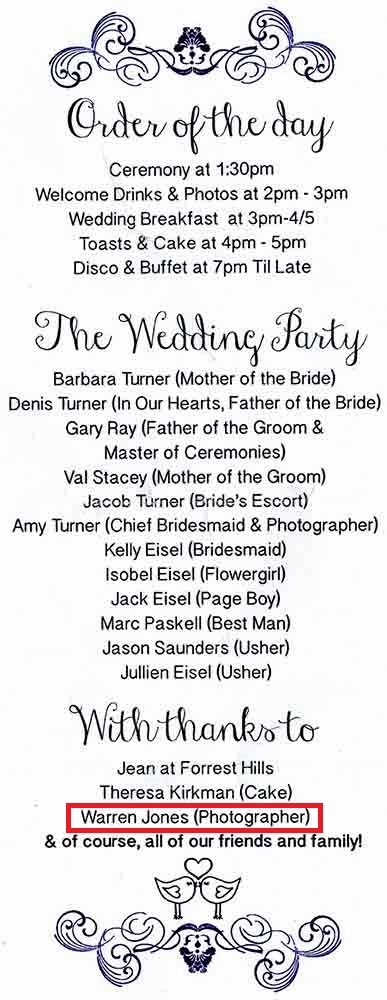
It was nice to get a mention on the order of service:


I managed to capture images ranging from the the groom, best man and ushers, bride arriving in the car, some during the ceremony, a very brief set of images outside as the weather allowed, the majority of set images in a side room, images of people at tables with their meals, speeches, and some bride with family friends joining the early evening celebrations, plus a few candid shots and friends together type of shots

My "mid shoot workflow"  - I was pleased that this had become almost second nature where I was checking flash exposure, image exposure via the histogram, using blinkies, checking for people with closed eyes, zoom cropping to check focus. This I was checking after almost every single shot. It was challenging doing this and trying to organise people in a calm way. I was fortunate that I agreed in advance for one of the bridesmaids, a student photographer herself (3rd year at uni)to help me organise family and friends as clearly I was disadvantaged not knowing people. Amy, the chief bridesmaid was going to take the photographs of the evening celebrations

During the shoot I used combinations of higher ISO spot focusing, spot metering (glad I had already performed the exercise on this as part of DPP as my understanding had greatly improved. There is in image I took where the couple sitting had their backs to a bright window, spot metering the couples faces ensure they didn't end up under exposed and the net curtain helped ensure the windows weren't over exposed too much.

Post shoot workflow....well the first job was to upload 3 cards of images via my card reader and into my PC. I then kicked off a back-up of these images both to my external hard-drive and to cloud storage. I was key I ensured the images were safe in several ways and storage on the cloud ensures I was protected against any freak mishap

I have a specific blog entry regarding cloud storage:
http://warrenjonesphotography.blogspot.co.uk/2013/11/cloud-storage-my-normal-workflow-is-to.html

My post shoot workflow again is based around that which had evolved and was written up as part of DPP Assignment 1 and I was glad that I had been getting into a rhythm or processing my work in this way. I finished my shoot with around 600 pairs of RAW and jpeg images, my target is to get down to around 100 and then to initially process a key 20-30 images for the bride and groom to review in addition to review of the other images within the target 100 that may be selected by the couple which I would then apply post processing to.

All images for viewing I've processed as out of the camera composition and then subject to target print I will crop accordingly.

However to ensure both friends and family attending as well as unable to attend not invited etc I posted a small selection of images on to Facebook the following day after the wedding to enable all to see early preview of some images so that they could congratulate the newly married couple,

For this blog I have detailed the workflow behind these specific images:

Image 1 

A small break in the weather although still cold and windy and thanks to the Grooms Father for carrying the bride across muddy ground to position the bride on the bridge allowed the set-up of this image, a full length shot

Aperture Priority at f/4 (1/1000) spot metered and spot focused

Opened the Image in RAW and applied the following changes:
 - Used Adobe profile for lens
 - Small S curve applied
 - Minor changes to exposure using "highlights" indicator
 - small adjustment to saturation
- small adjustment to shadows

Opened for layer adjustments of:
 -  Sharpening
 - Portraiture filter (imagenomic plug-in) slight smoothing)

Image Saved; Crop adjustment for composition purposes, image resized and saved as 100k file for web upload with minor watermark applied


I think I may want to come back to the full image and crop the two small white poles either side of the couple as these do appear a bit distracting

Image 2 

Aperture Priority at f/4 (1/1250) spot metered and spot focused. I've asked the Bride and Groom to kiss

Opened the Image in RAW and applied the following changes:
 - Used Adobe profile for lens
 - Small S curve applied
 - Minor changes to exposure using "highlights" indicator
 - small adjustment to saturation
- small adjustment to shadows


Opened for layer adjustments of:
 -  Sharpening

I've now, with time to do it, attempted to create a slightly more stylish image in black and white

I've opened the image using the Silver Effex plug-in, selected a preset conversion of High Structure (Harsh) and made minor adjustments to:
 - Contrast
 - Structure
 - Mid tones
 - Shadows
 - Dynamic Brightness

These changes helped bright out some drama in the sky and the wonderful range of tones. Having used the an aperture in f/4 with the background out of focus in black and white I feel the couple are really well separated from the background.

At this stage of noticed a dust spec in the image which I've cloned out

I've then sharpened the image and saved the file. This will allow me to use this file for a variety of potential print sizes later

I've now cropped the image to recompose and give better balance, resized for web and applied my watermark.


Image 3

Aperture Priority at f/4 (1/1600) spot metered and spot focused. You'll notice how much the light was changing with shutter speed heading toward double what it was a few images ago. This image is a more candid and natural image with a hint of fun, hopefully adhering to my brief.


Opened the Image in RAW and applied the following changes:
 - Used Adobe profile for lens
 - Small S curve applied
 - Minor changes to exposure using "highlights" indicator
 - small adjustment to saturation
- small adjustment to shadows

As above I've opened the image using the Silver Effex plug-in, selected a preset conversion of High Structure (Harsh) and made minor adjustments to:
 - Contrast
 - Structure
 - Highlights
 - Mid tones
 - Shadows
 - Dynamic Brightness

I've then sharpened the image and saved the file. This will allow me to use this file for a variety of potential print sizes later

I've now cropped the image to recompose and give better balance, sharpened, resized for web and applied my watermark.


I could possibly write a short story about the day. I have a lot more to do in terms of following my post processing for many other images, schedule a viewing and prepare images selected for printing.

There are a few more of the images I took on my website which can be found here:
http://www.warrenjonesphotography.com/photo_13071495.html

Can you spot the candid image and see how I could have framed it better :D

Lessons Learnt

a) You need to know your camera very well so that you are able to make changes very quickly without thinking

b) ISO is a god send, learn how and when to use ISO and at what max ISO you can really use and maintain quality images

c) Plan in advance - plans often need replanning on the fly but you need one to start with

d) Pre-shoot and Mid-shoot workflow are essential. Weddings don't allow many 2nd chances

e) Check the histogram all the time

f) Check the images on the screen all the time, many poses may need re-takes because someone has closed / semi-closed eyes

g) Don't be passive, people expect the photographer to help tell them what to do. At the same time of course be polite

h) look for candid opportunities, many fun and amusing incidents happen, try to capture some

i) Take lots of images, adjust angles and height of camera

j) remember your framing of images and likely print size. This was a big learning for me

k) At first you may feel awkward but you quickly blend in as part the wedding as whole

l) Smile at people, they often smile back and it will help relax people and allow them to look more comfortable in the image

m) Do not under estimate the amount of post processing, its key to have a workflow

n) Enjoy it, accept you will make some mistakes. I made many such as poor framing, poor use of flash at times, controlling backgrounds etc. However everyone has a first time and the learning will make the next time better


Sunday, 19 January 2014

DPP - Part 2 DR Digital Image Qualities - Exercise 4 - Your camera's dynamic range

DPP - Digital Image Qualities - Exercise 4 - Your camera's dynamic range

The instructions for this exercise was to find a scene with a distinctly high dynamic range.

In addition to the front of the house light by winter sun I've also included an A3 sheet of white card and an open doorway.

The purpose of this exercise is to determine the dynamic range of the camera, in this case I'm using a D700.

I'm using the camera in Aperture priority and have left the camera matrix metering. In the image below I've spot metered on the brick wall just below the lantern. 

I've not needed to make an exposure compensation as the camera has correctly metered at the point just before highlight clipping occurs. This is borne out for the blinkies in the camera and confirmed when looking at the RAW file in CS6


Aperture of F/8 used a shutter speed of 1/500

This is the jpeg above. The image overall appears exposed OK.
I've not needed to make an exposure compensation as the camera has correctly metered at the point just before highlight clipping occurs. This is borne out for the blinkies in the camera and confirmed when looking at the RAW file in CS6


Aperture of F/8 used a shutter speed of 1/2500
This is the jpeg above. Metering for the card the camera has reduced the overall exposure so that the card is not blown out. To achieve this the camera has used a shutter speed of 1/2500, 5 times quicker than the image above.  The result is that the image in general appears under exposed elsewhere.


Aperture of F/8 used a shutter speed of 1/250
This is the jpeg above. Metering for the dark elements in the door way the camera has selected a slower shutter speed which has resulted in all other areas of the image being over exposed

Using the following website I was able to quickly calculate the dynamic range between the 2 exposures, based on the shutter speed difference, was 3 1/3 stops. The camera when not using spot meeting selected a shutter speed of 1/500 as the average exposure which is a difference of just one stop from 1/250.


Zooming in on the first image using the RAW file and getting to 100% zoom crop on the white card using the eye dropper I can see how good the camera has been in its exposure, as mentioned above. The image below is recording, outlined red:
Red       = 251
Green   = 251
Blue      = 252


Continuing the exercise bringing out the detail from the shadows using the exposure tool its maxed out giving a dynamic range of 6.5 stops

Going on to the website DXO Mark, which is a well known company running tests against a vast number of cameras and lenses I found for landscapes the camera is tested, at least for landscapes, per the test to have a dynamic range of 12.2 EVs

http://www.dxomark.com/Cameras/Nikon/D700


As this is an independent company rather than the manufacturer I'm assuming these tests to be accurate but who knows, perhaps something went wrong for me with this exercise

There is some interesting information here on this website which details some interesting facts about the dynamic range and low light sensitivity of the human eye and comparisons between the eye and a camera's abilities:
http://www.cambridgeincolour.com/tutorials/cameras-vs-human-eye.htm

The aperture in the human eye is the pupil and the eye can quickly scan the view in front of it focusing and adjusting across the scene and the brain will also fill in any missing gaps. Alas the camera has just the RAW image to show for it. As I mentioned in an earlier exercise a big disappointment for amateur photographers can be the realisation that the camera cannot always copy what the eye sees then again like the eye, it needs some help in being told what element of the image it should focus on and adjust to.


Saturday, 4 January 2014

DPP -Part 2 DR Digital Image Qualities - Exercise 3 - Noise

DPP - Digital Image Qualities - Exercise 3 - Noise

I often use Ken Rockwell's site for information about camera's and lenses. He has a nice easy way of explaining things and in the most errs on the side of cheapness with quality. This can be very handy when looking to buy items second hand

The link below at the top of the page shows an interesting comparison between two images taken with the same Nikon D80 but one at ISO 100 and one at ISO 3200. Ignore the rest of his post if its only ISO you want to learn more about:

http://kenrockwell.com/tech/dslr-comparison/index.htm

With many camera manufacturers' squeezing more and more pixels onto the same size sensor then aside from larger images, image quality can deteriorate when out of prime image create conditions, normally lower light. Larger pixels will retain more tonal differences and be less susceptible to noise. Despite modern technology you only have to look at social media websites with images taken by camera phones in low light to see the noise that can get recorded in images.

I use a D700 which is a full frame camera but with a sensor recording just over 12.1mp it could be considered a low number by today's standards but at the same time is also one of the reasons its a great camera in low light.

I've found from previous experience that my D700 can produce usable images with ISO at 3200 but of course each circumstance when taking an image can be different and so results may differ also. See a previous log entry I have made:
http://warrenjonesphotography.blogspot.co.uk/2013_04_01_archive.html


In line with the exercise I've set up a simple shot of a mechanical hand in the bathroom where there is dappled daylight from an overcast day and utilised both a white and coloured background.

All images have been taken at f/8 with a 50mm lens. I've used the jpegs rather than processed the RAW files. I've taken a series of images starting at ISO 200: All images below are unaltered aside from reducing width of each image to 1000 pixels and reduced image size to around 100k for space reasons.

ISO 200


ISO 250


ISO 320


ISO 400


ISO 500


ISO 640


ISO 800


ISO 1000


ISO 1250


ISO 1600


ISO 2000


ISO 2500


ISO 3200


ISO 4000


ISO 5000


ISO 6400


ISO 8000


As you'd expect the shutter speed started to increase with the camera in Aperture priority at a fixed f/8 when the ISO was increased. Increasing the ISO allows the sensor to be more sensitive to light. Shutter speed appeared to even out around 1/10s then become faster at slightly larger intervals to compensate for more light being received by the sensor.

At this size of images its difficult to see much change in noise. However zooming in on the image at ISO 8000 the image appears to be more grainy as a result of the image noise. This is much more noticeable in the shadow area bottom right on the images.

What I also noticed, partly by accident is that the file sizes of the original images increased as the ISO increased. This varied at early ISO from 80kb up to about 400kb at ISO 8000. Michael zang in the following web page suggests that this is as a result of poor file compression with noisier images:
http://petapixel.com/2009/12/22/why-higher-iso-leads-to-larger-file-sizes/

Image noise and its relation to ISO is explained in much more detail in the following Wiki page:
http://en.wikipedia.org/wiki/Image_noise
In this wiki it mentions banding noise, similar to shadow noise which can be introduced in brightening shadows. My tutor commented on this in one of my images for Assignment 1. The wiki page also mentions Anisotropic noise variances in the columns or rows of pixels subject to the cameras orientation

Exercise Learnings
a) Increasing ISO allows the sensor to become more sensitive to light. This allows for faster shutter speeds

b) When using a camera hand held, increasing the ISO may enable a sharp image to be captured, even if more noise is in the image. Its easier to remove noise from an image, subject to limits where as an out of focus image caused by camera shake is likely unable to be saved by sharpening

c) Noise captured within an image can cause file sizes to increase. This appears to be as a result of file compression in jpeg being more difficult to process with noisy images

d) Noise appears to generate and increase more noticeably in the shadowy areas of an image

e) Noise will generate less noticeable on camera's with larger pixels e.g. cropped sensor with 12mp will have smaller pixel sizes than a full frame sensor with 12mp. For example this could mean a full frame camera at ISO400 produces less noisy images than a cropped sensor at ISO 100

f) Noise in images will become more noticeable / get worse as the image is increased. This one of the reasons why images taken on mobile phones seem OK and sharp when viewed on a small camera screen can look very noisy when viewed on computer screen. This is very evident when looking at images on social websites

g) Acceptable noise v intended image size v noise reduction processing. These are all considerations for the photographer and his/her tolerance for noise in the final image

h) There are various options of noise reduction through software. I personally use Imagenomic Noiseware. Below is an example of its capabilities

This is a zoom crop of the image above at ISO 8000 where I've cropped to display the noisy shadowy area:

ISO 8000  - NO noise processing
The noisy elements within the image are quite noticeable


ISO 8000  - WITH noise processing
In the processed image above noise in the image has been reduced but as a result there does appear to be some smoothing in the image and perhaps some detail lost, look particularly at the wrinkles in the un-processed image then look for these in the second image below

Which image is better? No doubt its permutations of my exercise learning g) above. An experienced photographer will understand what ISO limit produces a usable image for a specific size and at what level of digital post processing will be least disruptive or least noticeable in the final image

There is no doubt a number of good reasons why studio photographers, sports photographers and landscape photographers may use different types of camera.

Nikon D800 - Large images with lots of detail but less good in low light conditions. Great for Studio Photographers where lighting is perfect

Nikon D4 - Medium size images with very good detail. Smaller images mean faster image processing to memory card, sensor size v mp on sensor also allows good images in low light. Great for sports photography.

D700 - Small size images with pretty good detail. Small images can mean fast image processing with extra battery. Sensor size v mp on sensor allows for very good images in low light. Great for landscape photography